
For organizations exploring AI agents for business, choosing a tool can…
Summary
Learn how to build an AI agent for business by understanding the six core components of AI agent architecture. Explore how orchestration, AI models, business knowledge, approved actions, and system integrations work together to support enterprise AI workflows.
In my last blog, I walked through five strategic considerations for getting started with AI agents, from aligning on business goals to designing a controlled first implementation. Once you’ve identified the workflow you want to improve, the next question is how to build an AI agent that can support it. What information will it need? Which systems should it access? And where will a person need to review or approve its work?
Those decisions directly shape your AI agent architecture. While there are plenty of powerful tools that enable AI agents—anything from AI tools like Microsoft Copilot and Claude, to enterprise toolsets like Salesforce and Workato—implementing the right agentic solution in your business might need more than one system. The next step in getting started with AI agents for business is to understand how the different pieces of an AI agent work together and where you may need additional configuration or development.
In this blog, we’ll explore the six core components of AI agent architecture, how they work together, and what businesses should consider when building an AI agent and moving it into production.
What Are the Six Core Components of AI Agent Architecture?
AI agent architecture consists of six core components as shown below: triggers and interfaces, orchestration and workflow, AI models, knowledge and context, approved actions, and business systems. Together, these components determine how an agent receives requests, makes decisions, accesses information, and performs approved tasks. Understanding the agentic architecture helps you determine which capabilities you need and how they should work together.
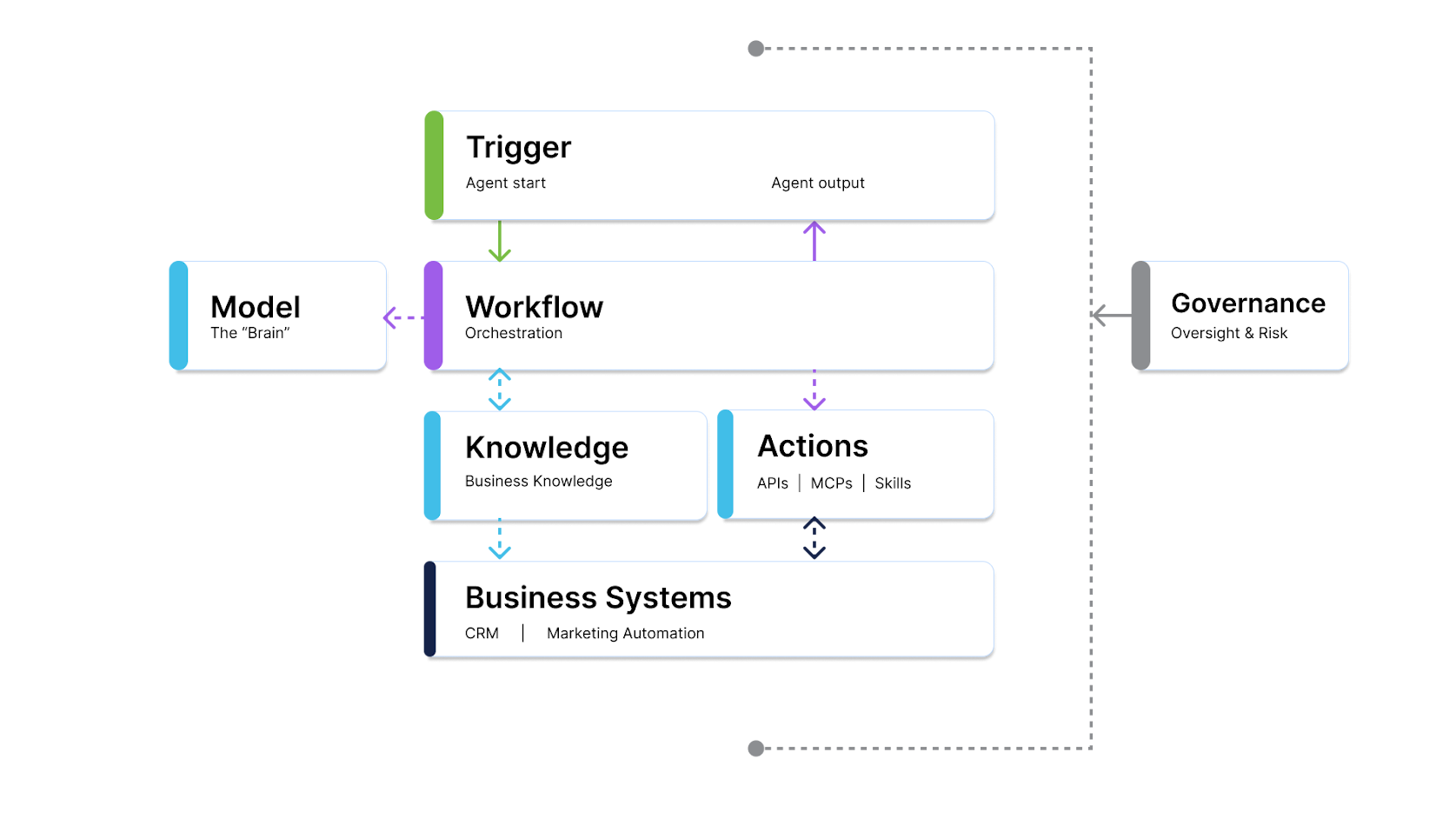
#1: Triggers and Interfaces
A trigger is the event or input that starts an agent’s work. It could be anything like an incoming email, a change to a record, a scheduled event, or a direct request from an employee. Choose a trigger that aligns with when the business needs the work to happen, so starting the agent doesn’t add an unnecessary manual step.
If the trigger requires a person to initiate the work, the agent will need an interface. The interface is how people interact with the agent, both for the triggering and to directly receive or review the output. Not every agent needs a dedicated interface, and it may work in the background and deliver results through existing systems.
#2: AI Orchestration and Workflow
You’ve probably heard the term “AI orchestration.” To clearly define the concept, AI orchestration is how the agentic system coordinates the way work moves between models, tools, systems, and people to accomplish a business goal. It manages the steps and dependencies in a workflow, routing requests to the right resource and coordinating tool calls, handoffs, and approvals. At the core of an agentic system, orchestration determines what the agent may do next and when it must stop or involve a person.
For business leaders, defining orchestration means establishing how the process should optimally run and what to do when things don’t go as planned. An agent may need to request missing information, pause for human review or correction, or escalate an exception. AI orchestration primarily works in three main components that we’ll discuss next: AI models, knowledge, and approved actions.
#3: AI Model as the “Brain”
The AI model is the brain behind the agentic system. It interprets information, evaluates options, and helps determine the agent’s next step. Orchestration sets the boundaries for those decisions, guiding the model on what it can do and how it should act. Selecting the right model (or models) for your AI agent starts with understanding the complexity of the work. The newest or largest model isn’t automatically the best fit; leaders need to consider quality, cost, and response time the workflow can support.
Some workflows may benefit from using different models for different tasks. A simpler model could handle routine requests, while a more capable model supports complex decisions. Your orchestration can route tasks to a designated model or allow the agent to select from approved models based on defined instructions. The goal is to match the model’s capabilities to the work so you’re investing in performance where it adds value.
#4: Knowledge & Context
An AI agent needs to understand both how your business operates and the specific situation it’s handling. For example, your standard service policy may establish how to respond to a customer request, but that customer’s contract terms or recent service history could change the appropriate action. This is where both knowledge and context come into play.
Knowledge is the business information the AI agent draws from, including procedures, documents, and business rules. Context brings the relevant information into the current task, helping the agent apply that knowledge appropriately. Sometimes, knowledge and context could be as simple as giving the AI agent access to the information, and sometimes you might need to clearly establish shared business definitions in a semantic layer. Using the same service policy example as before, an “active customer” needs to mean the same thing across sales and service systems.
When considering knowledge and context while building an agent, leaders should:
- Identify which sources the agentic workflow requires
- Ensure the sources are reliable, current, and accessible within the agent’s permissions
- Determine whether you need a separate layer that translates data into meaningful business terms.
That way, the AI orchestration can coordinate when and how the information is retrieved and made available as the agentic workflow progresses.
#5: Approved AI Actions
Approved AI actions define what you allow an agent to do in each connected system, such as your email, CRM, or data warehouse. These permissions should reflect the work you want the AI agent to accomplish and how much control you’re comfortable giving it. Approved AI actions guide what orchestration can direct the agent to do. It coordinates the permitted actions to achieve your business goal, routing work for approval or stopping when the next step falls outside the authority you’ve given the agent.
There are two categories of actions to consider:
- Read actions let AI retrieve information from a source system to answer a request or inform its work. For example, an agent could pull data to answer a business question that an existing report doesn’t cover.
- Write actions let AI make changes or take action in a connected system, such as permanently adding data to an existing report, creating a document, updating a customer record, or sending an email.
You can approve different actions for different systems. Your agent might be allowed to create a document in Microsoft Office but prohibited from sending email through Outlook. Or you might permit it to send customer communications through HubSpot while restricting access to your individual email account. All these approved AI actions allow the AI orchestration to accomplish the business goal you set for it in a governed, approved way.
#6: Business Systems
The last component to consider is how your agent integrates with your business systems themselves. You need to decide which systems the agent needs to connect to, such as your CRM, ERP, email platform, or data warehouse. These connections enable the agent to retrieve information and carry out approved actions within your business processes.
Depending on the workflow, the agent may access business information through a knowledge layer that draws from these systems, or connect directly to the systems to retrieve live information and carry out approved actions. You may leverage a connector, or an integration that enables access to specific information and actions. Before choosing a platform based on its available connectors, verify that they support the specific steps in your workflow. For example, a CRM connector that can retrieve records may still require custom development to update them.
How to Build an AI Agent and Move It into Production
Building the right AI agent starts with the workflow you want to improve. As we’ve explored, the information it needs, the systems it accesses, and the actions it can take all shape its architecture. Your existing technology may provide many of these capabilities, but getting them to work together and across multiple platforms may require custom agentic AI production. For example, you may build an agentic experience where you:
- Ask ChatGPT (or any other LLM of choice) to help you prepare for an upcoming meeting, triggering an agentic through the interface of the LLM.
- The agent orchestrates the request by pulling account activity in your business systems, validating sentiment behavior from your knowledge documents, and relying on reasoning models to comprehend the information.
- Because the agent relies on its approved actions to only read and not write any source data, it delivers back to the user a readout of the account status, recent engagement, and recommended meeting focus back in the LLM interface.
Getting this kind of experience may require an experienced partner to turn a strategic direction into a working system. Organizations need to understand platform capabilities, how business rules translate into agent behavior, and where human review belongs in the process. Zirous helps organizations work through these decisions, identifying what they can use from their existing investments and what they need to build or connect to support the intended workflow. Explore our AI services to learn more about putting agentic AI into business workflows, or contact us if you’re ready to assess a use case.
Related Posts



Comments (0)